Twitch VOD Download Workflow for Public Replays
Check public or permitted Twitch VOD links, separate replay limits from live capture, and keep permission notes before saving.
AnyVidDL can check public or permitted Twitch VOD links when the replay is accessible and saving is allowed. Twitch VOD support evidence is tested_passed, but live streams, subscriber-only videos, deleted replays, login-only access, DRM-protected, credential-gated, paid, or rights-restricted content should be refused instead of bypassed.
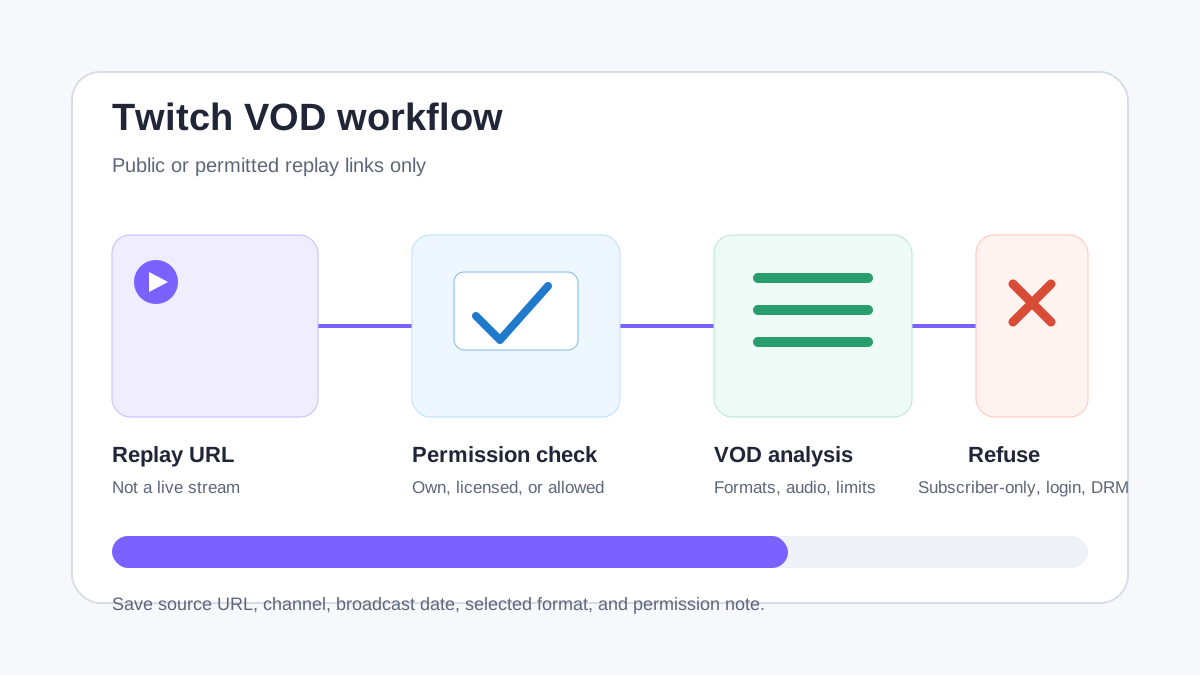
Direct answer
AnyVidDL can check public or permitted Twitch VOD links when the replay is accessible and saving is allowed. In the current support evidence, twitch:vod is marked tested_passed, with a public sample returning 5 video formats and 1 audio format.
That evidence applies to replay links, not to live-stream capture, subscriber-only archives, deleted VODs, paid access, private channel material, or DRM-protected streams. A safe Twitch workflow should explain when a replay can be checked and when the correct answer is to stop.
When this workflow fits
- You own the Twitch replay and need a backup, review copy, or editing reference.
- A streamer, organization, client, or rights holder has granted permission to save the VOD.
- The VOD is public, still available, and does not require subscriber-only access, account login, payment, DRM, credentials, or private channel membership.
- You need to inspect available formats before choosing a smaller offline reference copy.
- You can keep the channel, source URL, date, and permission context with the saved file.
When not to use it
- Do not use AnyVidDL to capture live Twitch streams.
- Do not bypass subscriber-only VODs, deleted replays, private channel content, login-only access, paid media, credential gates, DRM, or regional restrictions.
- Do not treat a public replay as permission to repost highlights, redistribute the stream, or use the file commercially.
- Do not promise that every VOD returns MP4, every quality level, complete chat, subtitles, or a fast browser-only result.
Safe steps
- Confirm that you own the VOD, have permission from the streamer or rights holder, or may lawfully archive it.
- Open the replay in a normal browser session and confirm that it is publicly visible without subscriber-only or login-only access.
- Copy the canonical Twitch VOD URL, not a live channel URL, dashboard URL, clipped preview, or tracking redirect.
- Paste one VOD link into AnyVidDL and review the returned formats, source state, and failure reason.
- Choose the smallest useful output for the permitted purpose, especially for long replays.
- Save the VOD URL, channel name, broadcast date, selected format, permission note, and capture date with the file.
Common failure reasons
| Failure reason | Twitch-specific meaning | Safe next step |
|---|---|---|
| Live stream URL | The source points to an active channel instead of a replay | Wait for an authorized VOD or use official Twitch tools |
| Subscriber-only or login-only VOD | The replay depends on account state AnyVidDL should not collect | Stop; do not provide cookies, credentials, or session data |
| Deleted or expired replay | The VOD no longer exposes public media | Record the failure and ask the owner for an official file |
| Expiring HLS segments | Long replays may rely on segmented media that changes over time | Retry only if the replay is still public and permitted |
| Format or audio mismatch | Available tracks depend on the source response | Choose an available permitted format or stop |
| Rights uncertainty | Public viewing does not establish permission to save or reuse | Keep the file out of redistribution workflows |
Privacy and rights boundary
AnyVidDL should not request Twitch passwords, private cookies, subscriber access, creator dashboard access, payment credentials, DRM keys, or session tokens. If a VOD requires those items, it is outside the public-link workflow.
Saving a Twitch replay does not grant reuse, reposting, commercial, or redistribution rights. Streamer permissions, event rules, music rights, chat privacy, sponsor materials, and team agreements may still apply. Keep source context and permission notes with every saved VOD.
Evidence and stop record
The repository support matrix records a public twitch:vod sample returning five video formats and one audio format. That result establishes a narrow tested_passed tier for a replay sample, not live capture, chat export, subscriber-only access, every quality, or future availability. For each check, record whether the URL is a VOD, its public state, the check time, returned track counts, and the exact failure reason. Stop when the source changes to live, deleted, login-only, subscriber-only, paid, DRM-protected, or otherwise restricted.
Related workflows
- Use HLS Downloader when a replay exposes HLS behavior that needs variant and segment context.
- Use M3U8 Downloader for permitted manifest inspection.
- Use the M3U8 / HLS workflow before creating longer replay tasks.
- Use the failure reason taxonomy to classify subscriber-only, expired, protected, or format-related failures.
- Review acceptable use before saving or sharing stream content.
FAQ
Can AnyVidDL check Twitch VOD links?
Yes. Twitch VOD is in the tested-passed support evidence for public replay links, with public-or-permitted and source-availability limits.
Can AnyVidDL download live Twitch streams?
No. This workflow is for permitted replay or VOD links. It should not be positioned as live capture or a bypass for subscriber-only access.
Why does a Twitch VOD fail?
Common reasons include deleted replays, subscriber-only access, login requirements, region restrictions, expired HLS segments, file-size limits, or platform response changes.
What should I record with a saved Twitch VOD?
Keep the VOD URL, channel name, replay date, permission note, selected format, and any relevant failure or task status.
Related pages
hls-downloader
Open this related workflow or decision page.
m3u8-downloader
Open this related workflow or decision page.
guides m3u8-hls-download-workflow
Open this related workflow or decision page.
methodology failure-reason-taxonomy
Open this related workflow or decision page.
legal acceptable-use
Open this related workflow or decision page.