M3U8 vs MPD vs yt-dlp: Which Video Download Workflow Fits?
Compare M3U8 and MPD streaming manifests with yt-dlp's local workflow. Learn what each format reveals, what it cannot prove, and when to stop.
M3U8 and MPD are streaming manifests, while yt-dlp is a local command-line workflow that can inspect supported public sources. A manifest describes variants and segments; it is not automatically a finished MP4. Choose the workflow from the public source, available tracks, required output, and your permission to save the media.
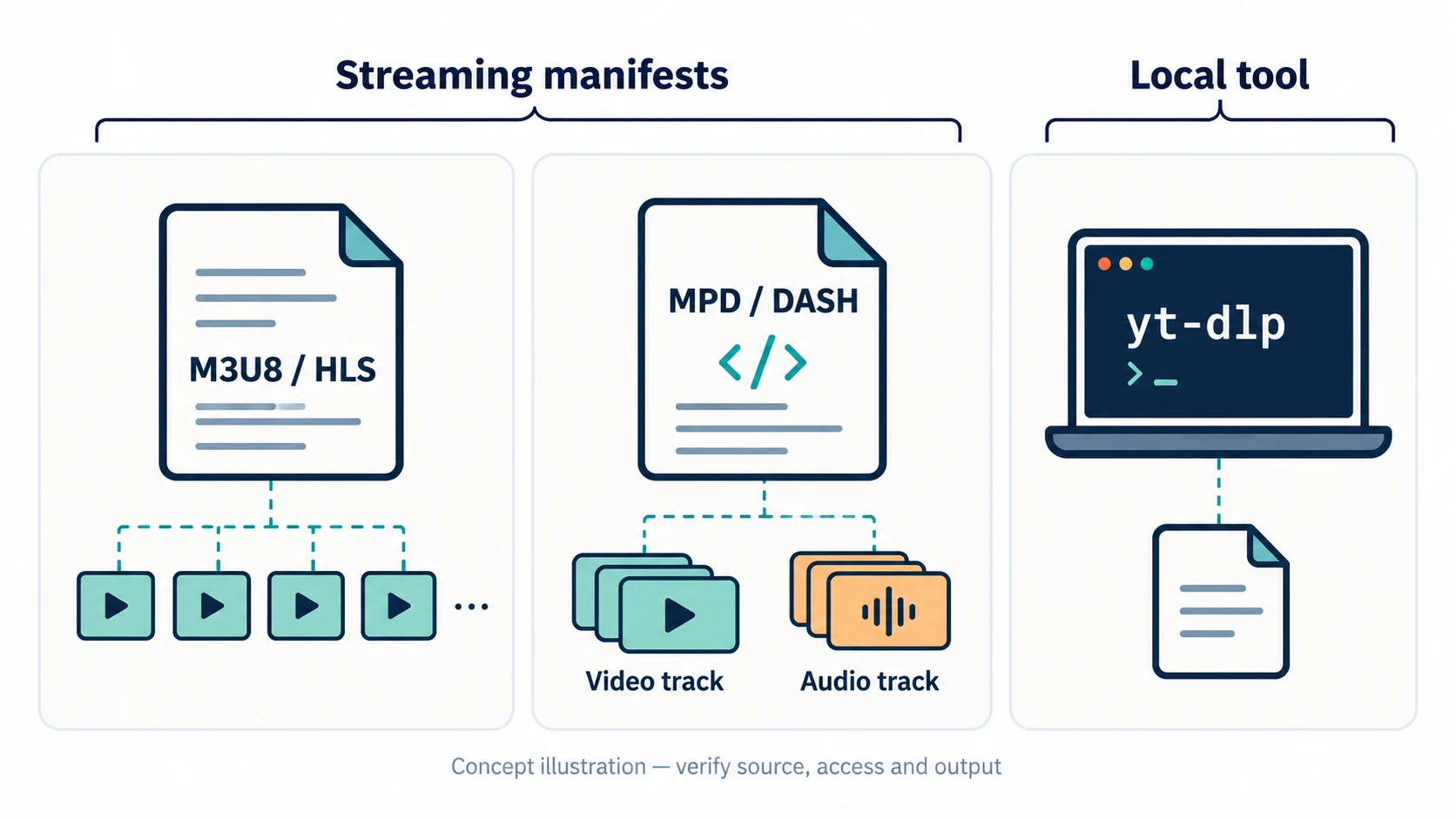
M3U8, MPD, and yt-dlp are different layers
| Item | What it is | What it can reveal | What it does not prove |
|---|---|---|---|
| M3U8 | HLS playlist | Quality variants, segments, alternate audio, subtitles, and some encryption metadata | That every segment is available or that an MP4 can be created |
| MPD | MPEG-DASH XML manifest | Adaptation sets, representations, codecs, durations, and segment templates | That the source is public, unencrypted, or permitted to save |
| yt-dlp | Local command-line downloader and extractor | A source-specific inspection and, for supported authorized sources, download candidates | Universal platform coverage, rights clearance, or successful playback |
The first two describe how a player receives media. The third is a tool that may interpret a page or manifest. Comparing them as if they were competing file formats creates the wrong expectation.
When an M3U8 workflow fits
Use an M3U8 workflow when a public or permitted page exposes an HLS playlist and you need to inspect its variants. A master playlist may offer several resolutions, while a media playlist points to the segments for one rendition. Audio may be declared separately.
Start from the canonical public page, copy the playlist only when it is openly available, and check whether the source exposes audio. A returned .m3u8 URL is still a playlist. It may expire, depend on a referrer, or point to short media segments instead of one file.
AnyVidDL's M3U8 tool is suited to source inspection. The current web workflow does not promise to fetch every segment, merge separate tracks, or produce a finished MP4.
When an MPD workflow fits
MPD is associated with MPEG-DASH. Its XML structure can describe video and audio adaptation sets, multiple representations, codecs, language tracks, and segment templates. This is useful when you need to understand how a player selects a representation.
An MPD response does not remove the need to check access and permission. A manifest can be public while its segments expire, require headers, or depend on an entitlement. It may also describe encrypted media. Do not treat a visible MPD URL as permission to bypass a paywall or DRM.
When a local yt-dlp workflow fits
yt-dlp can be useful for technical users who can install, update, and audit a local command-line tool. It may select a video and audio format, download a supported public source, and pass the result to local media tools. Exact behavior depends on the extractor, source response, and local installation.
Keep the stages separate: URL identity, source access, format selection, download, merge, playback, and reuse permission. A command that starts successfully does not prove that the final file contains sound or that the content may be republished.
Choose by the problem you actually have
- You have a public M3U8 URL and need to see variants: inspect the playlist first.
- You have a public DASH page and need representation details: inspect the MPD and its adaptation sets.
- You need a local, repeatable workflow for authorized files: consider a maintained local tool and verify its output.
- You only need a direct MP4 already exposed by the source: use the direct file and check duration and audio; conversion may be unnecessary.
- The page requires login, payment, credentials, or DRM: stop and use the official access or export path.
Common mistakes
Changing .m3u8 or .mpd to .mp4. Renaming a manifest does not package its segments.
Selecting the highest resolution without checking audio. The highest video representation may be video-only, with audio declared elsewhere.
Assuming a parser proves a download. Parsing can identify metadata while the file, merge, playback, and permission stages remain unverified.
Retrying an expired playlist. Restart from the canonical public source once. Repeatedly using an old signed URL usually does not repair the source.
FAQ
Is M3U8 the same as an MP4 file?
No. M3U8 is a playlist that can reference HLS segments, variants, audio groups, subtitles, or access rules.
Is MPD the same as M3U8?
No. MPD is an XML manifest used by MPEG-DASH, while M3U8 is a playlist commonly used by HLS. Both describe delivery resources rather than guaranteeing a finished file.
Can yt-dlp download every M3U8 or MPD URL?
No. Support depends on the public source, access rules, manifest structure, available tools, and current extractor behavior.
Does AnyVidDL convert M3U8 or MPD to MP4?
The current AnyVidDL web workflow can inspect supported public source options, but it does not promise hosted segment merging or MP4 conversion for every manifest.
Technical references
- HTTP Live Streaming, RFC 8216: media/master playlists, alternate renditions and media segments.
- DASH-IF dash.js manifest handling: XML MPD parsing, adaptation sets, representations and segment templates.
- yt-dlp official format-selection documentation: local format selection and separate audio/video streams.
This is a workflow comparison, not a claim that a particular source or download was tested successfully.
Related pages
Chrome M3U8 Downloader: Find the Playlist and Check the Result
Find an HLS playlist in Chrome Network, distinguish master and media playlists, and diagnose missing audio, inaccessible resources, and incomplete downloads.
yt-dlp Web GUI: Use yt-dlp-Style Workflows Without Installing
Compare a browser link checker with yt-dlp -F using one public HLS stream, including exact rendition labels, codec details and estimated file sizes.
M3U8 / HLS Download Workflow
Read real HLS master, media and audio-group entries, then check the downloaded rendition for picture, duration and the intended track.
How to Convert M3U8/HLS to MP4 for AI Editing and Review
Learn how to inspect HLS (.m3u8) manifests for separate audio tracks and variants, remux permitted streams into MP4, and verify files before uploading to AI tools.