How to Save a Permitted Imgur Video
Check a public Imgur video post, distinguish a single item from an album or gallery, and preserve source and permission context.
AnyVidDL can check a public or permitted Imgur video item when its media remains accessible. Use the canonical item URL, confirm permission, and stop for private, deleted, login-only, protected, album-wide, gallery-wide, or rights-unclear material.
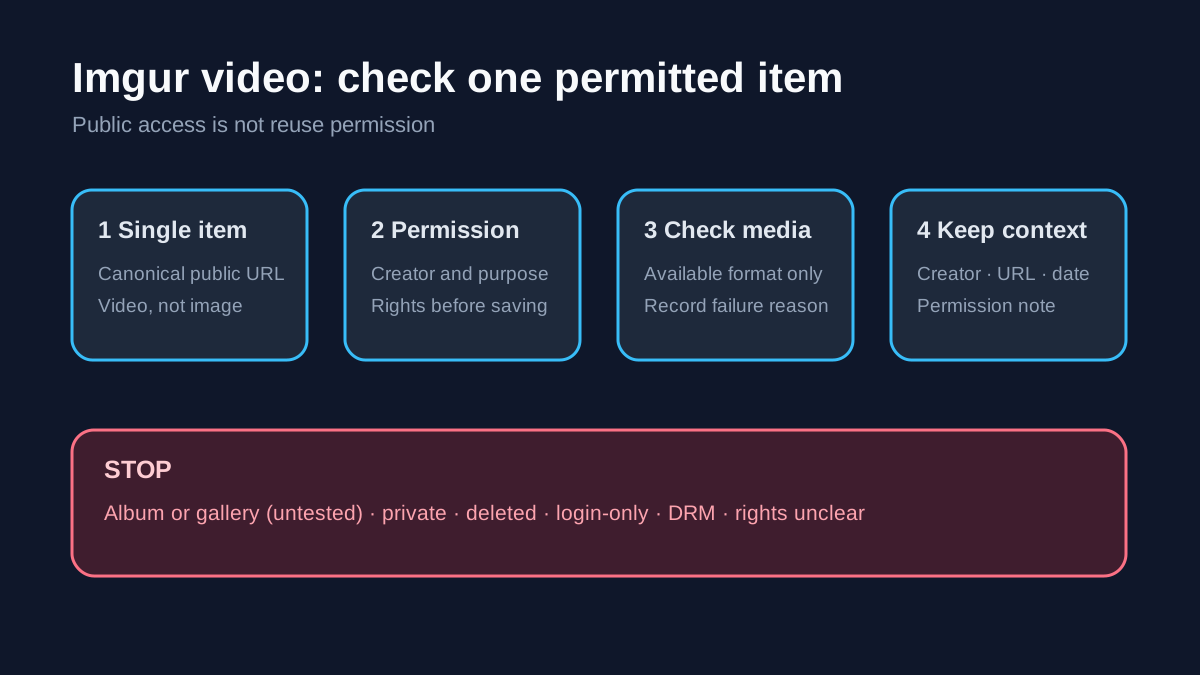
Direct answer
AnyVidDL can check a public or permitted Imgur video item when its media remains accessible. Repository evidence marks the Imgur single-item extractor tested_passed; the recorded public sample returned two video formats and no separate audio format. This result supports a careful single-item workflow, not a promise for every post.
Imgur albums and galleries are a separate boundary. Their extractors are only declared_supported_untested, so do not present album-wide or gallery-wide saving as verified support. Confirm that the canonical page contains one video, that you may save it, and that no account or access-control bypass is required.
When this workflow fits
- Backing up an Imgur video you created or manage.
- Saving one public clip with the creator's permission for research, accessibility, review, or personal records.
- Checking a canonical single-item page and preserving its creator, title, source URL, permission note, and check date.
- Reviewing the available format rather than assuming HD, audio, or a particular container.
When not to use it
- Image-only posts, albums, galleries, profile feeds, or bulk exports.
- Private, deleted, login-only, paid, DRM-protected, credential-gated, region-restricted, or rights-restricted media.
- Removing attribution or reposting a meme, clip, animation, or embedded third-party work without permission.
- Any workflow requiring passwords, cookies, session tokens, or access-control workarounds.
Safe steps
- Open the canonical Imgur item and confirm that it contains video rather than only a still image.
- Check the creator, post context, and permission for your intended use. Public visibility is not reuse permission.
- Confirm that the URL identifies one item, not an album or gallery.
- Submit one URL to AnyVidDL and review the returned title, format, and failure reason.
- Choose only an available permitted format; do not assume separate audio or guaranteed quality.
- Save the source URL, creator, permission note, selected format, and check date with the file.
Common failure reasons
| Failure | Imgur-specific meaning | Safe next step |
|---|---|---|
| No video found | The item may contain only an image or animation not exposed as supported video | Recheck the original item; do not manufacture a media URL |
| Album or gallery URL | The URL invokes an untested multi-item route | Open one permitted video item or leave it unprocessed |
| Deleted or unavailable | The post or underlying media is no longer public | Record the failure and ask the owner for an official copy |
| Login or restriction | Access depends on account state or a policy control | Stop; never provide credentials or private session data |
| Format mismatch | The public response does not expose the expected audio, quality, or container | Use an available option or stop |
| Rights unclear | Public viewing does not establish permission to save or reuse | Obtain permission before continuing |
Privacy and rights boundary
AnyVidDL should not request an Imgur password, private cookie, session token, payment detail, or DRM key. A failed public-link check is not an invitation to locate hidden media endpoints. Keep creator and source context intact. Downloading does not grant editing, commercial use, model-training, reposting, or redistribution rights.
Related workflows
FAQ
Can AnyVidDL check Imgur videos?
Yes, for a public or permitted single video item when the source remains accessible. The evidence does not cover every post state.
Can I submit an Imgur album or gallery?
Do not treat that as verified. Album and gallery extractors remain untested candidates.
Why does an Imgur URL return no video?
It may be image-only, multi-item, deleted, restricted, or no longer exposing supported public media.
Can I repost the saved clip?
Only with the required rights or permission. Saving the file does not grant reuse rights.
Related pages
Safe social video download workflow
How to check rights, choose a supported tool, understand failure reasons, and save social videos for personal offline use.
Video Download Failure Reason Taxonomy
A standard failure vocabulary for download pages, queues, API responses, and support docs.
archive.org Media Download Workflow for Public Archives
Check public archive.org media links, handle playlist-style archive items, and preserve rights and source metadata before saving.
Dailymotion Video Download Workflow for Public Links
Check public or permitted Dailymotion links, understand embed and protected-video failures, and keep a safe source record.