How to Save a Permitted Flickr Video Safely
Check a public Flickr video page, choose an available format, and preserve license, owner, and album context.
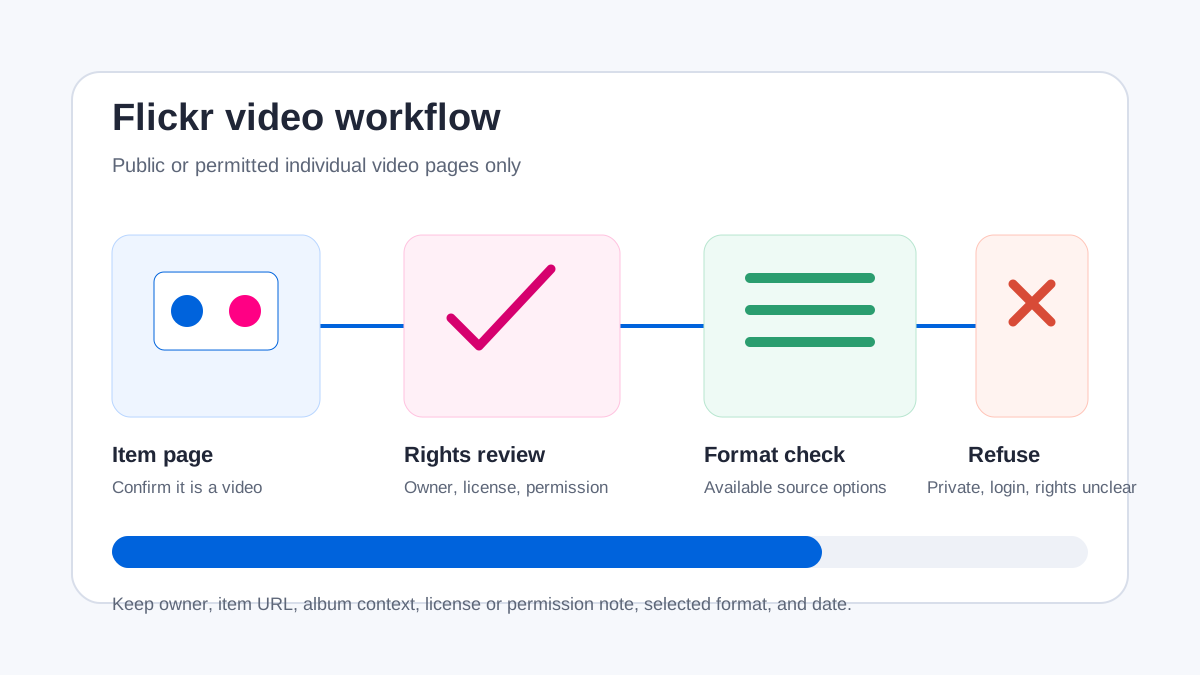
AnyVidDL can check public or permitted Flickr video pages. Confirm the item is a video, verify the owner's license or permission, and stop for private, login-only, deleted, restricted, or rights-unclear media.
Direct answer
AnyVidDL can check public or permitted Flickr video pages. Flickr is listed as tested_passed in the repository evidence, where the tested public sample returned video formats. That evidence supports a careful public-video workflow; it does not prove that every photo page, album, collection, private item, or future Flickr response works.
Before saving anything, confirm the Flickr item is actually a video and review its owner, description, displayed license, attribution instructions, and your permission. Stop for private, login-only, deleted, paid, DRM-protected, credential-gated, region-restricted, or rights-unclear media.
When this workflow fits
- Backing up a Flickr video you uploaded or manage.
- Saving a public video when its owner or displayed license permits your intended use.
- Keeping a permitted research, accessibility, documentation, or preservation copy with source context.
- Checking one canonical Flickr video item page rather than an album, search page, or photo-only item.
- Preserving the owner, item title, source URL, album context, license or permission note, and check date.
When not to use it
- Private, friends-and-family, login-only, deleted, paid, DRM-protected, or otherwise restricted Flickr items.
- Photo-only pages, search results, albums, galleries, collections, or bulk-account exports when the goal is a single tested video workflow.
- Content with no clear license or permission when the intended use requires copying, editing, publishing, or redistribution.
- Attempts to remove attribution, ownership context, access controls, or license notices.
- Workflows that require account credentials, private cookies, or session data.
Safe steps
- Open the canonical Flickr item page and confirm it contains a video, not only a still photo.
- Record the owner, title, description, album or collection context, displayed license, and any attribution conditions.
- Confirm that saving the video is permitted for your intended purpose; a public page alone is not permission.
- Copy the canonical item URL and submit one link to AnyVidDL.
- Review the returned title and available media options. Do not assume every resolution, audio track, or MP4 variant exists.
- If analysis fails, record the reason and verify the original page before retrying. Do not provide credentials or bypass privacy settings.
- Save the source URL, owner, license or permission note, selected format, and check date with the file.
Common failure reasons
| Failure | What it can mean on Flickr | Safe next action |
|---|---|---|
| No video media | The URL is a photo-only item or page without an accessible video response | Confirm the media type and use the original Flickr page |
| Album or collection URL | The link describes several items rather than one tested video page | Open the permitted individual video item and use its canonical URL |
| Private or login required | Visibility depends on an account, group, or relationship setting | Stop; do not share credentials, cookies, or private sessions |
| Deleted or unavailable item | The owner removed the item or changed its visibility | Record the failure and do not search for a bypass copy |
| Format unavailable | The page does not expose the assumed resolution or media variant | Use an available permitted option or the owner's official download |
| Rights unclear | The license, attribution, or owner's permission does not cover the intended use | Treat reuse and redistribution as not permitted until clarified |
Privacy and rights boundaries
AnyVidDL should not ask for a Flickr password, payment data, private cookie, session token, or DRM key. Friends-and-family visibility, private albums, member-only groups, and other account-bound states are outside a public-link workflow.
Flickr pages can display creator and license information that matters to later use. Preserve that context. A Creative Commons label, when present, still has conditions; a public page without a reuse license is not automatically free to copy or republish. Saving a file does not grant editing, commercial, training-data, redistribution, or attribution-removal rights.
Related workflows
FAQ
Can AnyVidDL check Flickr video pages?
Yes. Flickr is marked tested_passed in repository evidence for a public video sample, subject to item availability, page state, and product limits.
Does a public Flickr page mean the video is free to reuse?
No. Check the owner's license, description, attribution requirements, and your intended use. Public visibility alone does not grant reuse rights.
Why does a Flickr URL return no video?
The page may contain only photos, point to an album instead of one video item, be private or deleted, or no longer expose a supported public media response.
What metadata should I keep with a Flickr video?
Keep the owner, item title, canonical URL, album or collection context, displayed license or permission note, selected format, and check date.
Related pages
video-to-mp4
Open this related workflow or decision page.
guides safe-social-video-download-workflow
Open this related workflow or decision page.
methodology failure-reason-taxonomy
Open this related workflow or decision page.
legal acceptable-use
Open this related workflow or decision page.
legal privacy
Open this related workflow or decision page.